FRESH Hacker News
Hacker News Hacker NewsAll you need is a regular ~$50 trackball and a regular ~$100 keyboard without a numpad. (You can have an overlay for that, if you need it.)
As someone else pointed out, this new trackball will make you move your fingers (and wrists) significantly off home row. If you do that in one direction or the other doesn't really matter.
If this works better for you than a Logitech or Kensington trackball, sweet, use it. But so far all the reviews are like "I've never used a trackball, but this looks cool". We've had this technology since the literal 1990s guys.
I'm odd - what I want is a stupidly big trackball, like 4 inches across or so. And it should be able to detect rotation about the vertical axis. It infuriates me how optical tracking systems are designed to provide just translation and no rotation when there's a whole other DoF in play.
Also, Keychron keyboards are way too heavy. Like 1 Model M too heavy. And web-based only flash updating doesn't feel like real ownership. The upside is it's a model that allows exchanging switches. One thing I didn't appreciate was red key caps without black replacements without buying a whole set.
Source: https://www.notebookcheck.net/Keychron-Nape-Pro-wireless-tra...
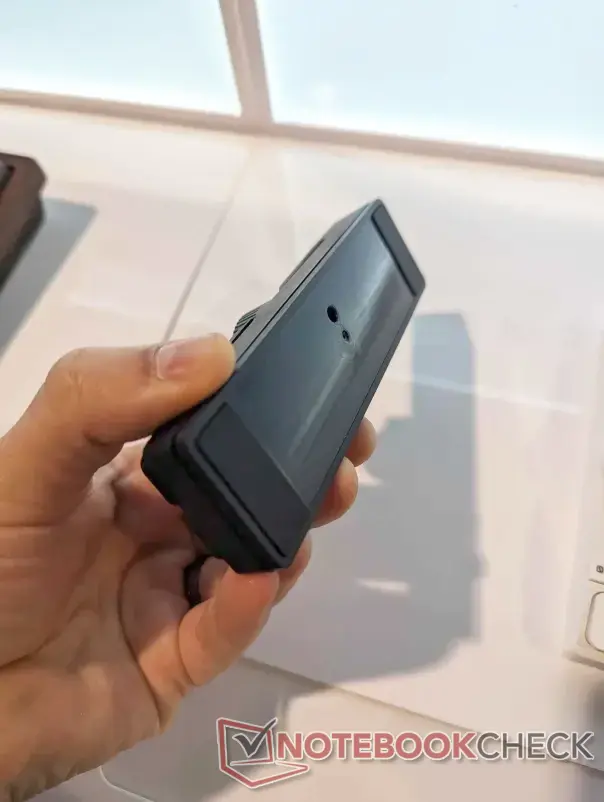
I'm glad they implemented this! Checking the photo of this particular feature, it seems the 1/4-20 thead is paired with another hole: https://www.notebookcheck.net/fileadmin/Notebooks/News/_nc5/...
I was very hopeful that the hole arrangeemnt would be for an ARRI pin-lock: https://www.arri.com/resource/blob/320202/04f5271d1d21f8c7db...
Referring back to the Nape Pro picture from CES, this appears not to be the case. One thing these 1/4-20 mounted ergonomic keyboard designs need is a locking mechanism that prevents the keyboard from gradually pivoting during regular use. For the Nape Pro, I wonder how feasible it would be to drill the hole into it's exterior?
If you're thinking of mouting these at the edge of a surface, then make sure your 1/4-20 mounting arms use the ARRI pin lock on that end. It's annoying when your keyboard pivots, but if the whole mounting arm pivots, then you might be in trouble (i.e, a loosened mounting arm swings 180 degrees down towards the ground, potentially damaging your keyboard).
Here are some examples of those types of arms from SmallRig:
https://www.smallrig.com/Rosette-Magic-Arm-11-inch-with-ARRI...
https://www.smallrig.com/Rosette-Magic-Arm-7-inch-with-ARRI-...
https://www.smallrig.com/SmallRig-Magic-Arm-with-Dual-Ball-H...
And a clamp that has the ARRI holes: