FRESH Hacker News
Hacker News Hacker Newshttps://www.justinmklam.com/posts/2026/02/beginners-guide-sp...
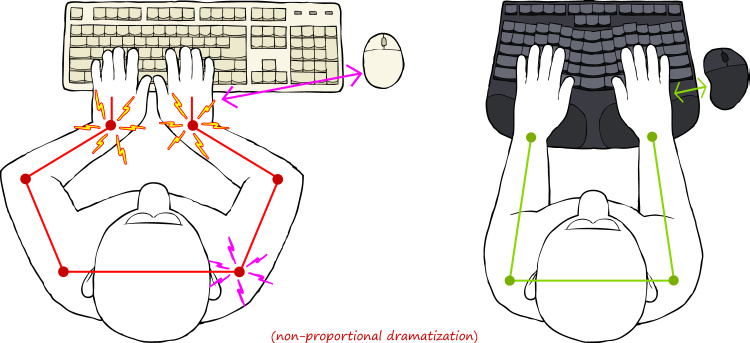
I don't know if it's just me, but I don't use the keyboard like that. I know the illustration is said to be exaggerated, but still. There is no need to squeeze your hands in front of the keyboard. Just naturally bring your hands in front of chest, the same as when you are reading a book or writing notes with a pen. No twisted wrists. No ulnar deviation. The idea that you can't do something with your hand in front of the center of your chest without hurting the wrists seem like a strange supposition.
Admittedly, I've never looked at a significant number of people typing on a non-split keyboard, so I don't have the data to refute the need of this invention. I just feel like the natural posture already doesn't have the problem of ulnar deviation.
This allows the hands to do more with the keyboard while resting the hands on home row. -- For users comfortable adding a bit of complexity for the benefit of increased expressiveness (e.g. vim users), having extra thumb keys allows bringing the full functionality of the keyboard to within reach of the hands on home row.
For me, I think that these keyboards fix many silly design flaws of the traditional keyboard makes them interesting enough to be worth using.
It is missing some newer designs, but it at least shows that not all split keyboards are tiny things with half the keys removed.
I've been using an ErgoDash for 6 years. I have one at home and another at work. If there had been a similar keyboard with real F-keys in 2019 I would have chosen that instead, but it's only a very minor annoyance.
If I was looking now I think I'd buy the Kinesis Advantage360 (I could keep using the layout I am now used to) or Kinesis Advantage2 (dished, but has fewer keys than I'm used to).
(If anyone keeps up-to-date with split keyboards etc and wants to take over the gallery site, just let me know. I'm happy with the keyboard I have, so I don't spend time researching more.)
Any key caps for ortholinears I could find at all smooth.
Irritatingly, this doesn't work by default on the mac where the meta keys only affect the keys on the keyboard owning the depressed key (IE left shift and right keyboard l will not result in L).
It uses a bit more desk space, but is otherwise a pretty good way to test out "do I want a split keyboard?"
Russian, for example, has 33 letters.
So if you’re someone like that, you really want that ordinary macbook-like number of keys = larger non-symmetrical right half.
—
As for the ortholinear keyboards, I spent a few months with the latest kinesis but sold it eventually: not that comfortable.
Just clench your fist and you will see that not all your fingers are moving in straight parallel lines. I don’t buy the ortho logic at all. I would argue that left half of the ordinary keyboard is even more ergonomic in this sense.
—
Also don’t bother with dvorak, qwerty is 80/20 pareto stuff. Just isn’t worth it compared to returns.
—
Tdlr; split, traditional layout https://uhk.io/ is my best purchase: use it for almost 5(?) years. Modded it for swappable switches, lubed, what have you.
Don’t waste money for uhk riser, not worth it. Small plastic built-in legs are more than enough.
Wooden palm rest is a must though.
—
Previously was a big fan of microsoft split ergonomics (2nd gen and sculpt later)
—
BTW if you use multiple OS, map the ctrl key on windows/linux to the same place where command is on mac. Shortcuts will be the same physical keys, also it is much more comfortable to have this pressed with a thumb instead of a pinky.
Though you would want to buy a rounded key cap (like a spacebar) of you use a mechanical keyboard — it is painful to press the keycap corner with a thumb if it is not rounded.
I tried multiple split keyboards over the period of 2 years and never grew out of these habits. I always wished, at the least, that some of the middle keys were duplicated between the two halves.
Eventually I received some permission to accept my personal "kinetic signature" (so to speak). Then the chronic wrist pain that led me to try split keyboards in the first place vanished. So I went back to using a normal tenkeyless. This led me to believe that split keyboards were ideal for some people, but that other people (like myself) are predisposed to a sort of perfectionism that entails physical guarding and chronic pain.
I still wish I had a wireless split keyboard for times when I'm supine and need to type, though.
To this day I think this is one of the best pieces of hardware that I bought.
I see one instance on this page of a keyboard with double "B" key ("Alice layout"), but not the others.
I've been interested in trying a split keyboard, but I like to type those middle keys with either left or right hand depending on the moment, so all the split keyboards I've tried have ended up somewhat annoying, for that reason.
There are a lot of keyboards I'd like to try, but I'm pretty happy with these.
When I switched to a split keyboard 20 years ago, I realized that I used my right hand to type T and B. But it was a pretty quick transition when I kept slamming my index finger into the gap!
Kinesis Advantage keyboards have been popular for decades and proven ergonomic benefit - mainly because the cup avoids wrist movement and the high-traffic keys are moved to the stronger thumb. Some users prefer the newer split Professional to avoid constraining arm position. These keyboards stopped my RSI cycle decades ago, and improved my speed by roughly half. (Also a US company, with fantastic support.)
It has too many keys in thumb clusters and bottom row, but you can easily remove them.
I use the Model 100 from Keyboardio. I have two. https://shop.keyboard.io/products/model-100
When I travel I use either their version of the Atreus https://shop.keyboard.io/products/keyboardio-atreus or their version of the Preonic, which I think was only a crowdfunded model.
Keyboardio is run by a programmer who developed debilitating RSI and his wife. He tried a bunch of keyboards, then designed his own. Lots of people asked where to get one, so they refined it into a product and started the company. That was the Model 01, and I have two of those.
Having the function button located for the base of the thumb is really comfortable and useful. The swappable bases (flat linked, tented, and the separate stands) are nice to have. The link between the two halves of the models 01 and 100 uses an Ethernet cable. The stands use a standard camera tripod threaded connector, so building your own mount for a chair or armature is simple enough.
I had a warranty issue with one of my Model 01 boards. One keyswitch didn’t work reliably. Instead of sending the whole thing back, Jesse sent me four or five spare switches, some stickers, a personal note, and a page explaining I could desolder and solder the switch without voiding the warranty (as long as I didn’t damage anything in the process of course). The Model 100 is socketed.
The hardware design and the firmware are open source.
That said I used to use a lily58 and for me it was great. I have a lot of papers, notes and books on my desk. A small easily movable keyboard meant that i could have something between the keyboard halves, writing and reading without issue
That said, I do believe the change will add a few more good years to my career, so I’m committed to seeing it through. I went with a relatively inexpensive keyboard and a modified Engram 2 layout. The reduced finger travel and more natural arm positioning have already made a noticeable difference.
Give it another year and I expect to reach an acceptable speed as well. All in all, I’m happy with the switch.
It's split in two so you can position them at shoulder width. It's angled so your wrists are in more natural positioning (reduced pronation), and curved to prevent finger overstretching (finger joints have arc-shaped range of motion). It's injection molded and hot-swappable.
I've been working on this since 2022 and am getting close to launch. It's gotten very good feedback from beta testers.
Been using split ergo since original ergoxdox drop. Currently using lily58.
If someone wants to go down this rabbit hole (I did because I had pain from writing my first book), I think the Voyager is the best option.
One thing I hate about the lily58 is the lack of decent cases. The plates are too flexible. I have a 3D printed case from etsy and the keys continually pop out of it or get finicky about seating and registering a click.
However, these days I'm typing much less. Voice recognition is so good that I generally press a button to start recording, press it again to transcribe. Then press another button to paste, press it again to hit enter.
Logitech's ergo k860 is affordable, has a palm rest (most mechanical keebs don't), and has an excellent ergonomical shape. And works right out of the box, with Bluetooth enabled.
The keys are membrane-based, which some may dislike because they are not mechanical - but it's actually more ergonomic, as they require much less pressure and travel length to achieve an input, meaning less wear on your fingers.
It is hilarious when others try type on it, if they can manage to get their head around the split they still have no idea how to 'use' it due to my custom layers and bindings.
But I have one big question -- why aren't the "middle" keys replicated on both sides of the keyboard? That is, for example, why not have two 'g' and 'h' keys? There are always times when you have to adapt; when you're holding down a tricky combination of alt-ctrl-shift keys or something where on a flat keyboard one would just reach with the "wrong" hand to hit a middle key; why not just replicate them?
I found it wasn't for me (too big, uncomfortable, keys too far apart, harder to type without looking IIRC) and the company (in Canada) refused to issue a refund and I was SOL.
I switched to Dvorak at the same time that I switched from row staggered keyboards (so five years ago), and I must say, if you're thinking about switching layouts like that, there is no better time than when switching to a wildly different keyboard. My Dvorak muscle memory is entirely tied to typing on a split, columnar keyboard, and my QWERTY muscle memory is entirely tied to row staggered keyboards. I have never used Dvorak on a row staggered keyboard, and I have never used QWERTY on my Moonlander or Voyager. I think that's helped with maintaining my ability to use standard QWERTY keyboards after not using them regularly for years.
It seems to have this issue (or maybe Macbooks do? I don't know..) where, waking my computer from sleep, the right side of the keyboard doesn't work. It's quickly fixed by unplugging and replugging the right side of the keyboard into the left, or unplugging and replugging the entire keyboard into the computer.. it's a shame that I have to do that sometimes, though.
Also, unfortunately for the high price point it's too hard to actually try those out somewhere. Maybe works if you have friends, but I'm not going to spend hundreds on sth only to find out it doesn't work for me after half an hour. There's probably an option to send sth back, but even that is going to be a nightmare with small vendors.
Main reason for my switch is that I felt that my shoulders have a wider stance than before. I don't know if it's because of an improvement in fitness (I do a lot of shoulder and back work), or maybe with age I lost a bit of shoulder internal rotation mobility.
Either way, the learning curve was like a few minutes for me. Guess it's a perk of experience and the habit of touch typing.
If I was coming back to a smaller keyboard, I doubt I would even know where to find punctuation.
I've had steroid injections into the tendon sheaths of my fingers a couple of times, which hurts like a bugger when it's done but definitely improves things after a few days. It isn't a cure, though, and my hand doctor thinks I'm going to need surgery eventually.
I have to assume that a split keyboard won't help this. Is there anything that might, short of a voice interface?
I'm probably going to end up building a custom board with the features I want (gentle curve, ISO layout, nice switches) since what I want doesn't seem to be available off-the-peg. (The X-Bows keyboards are quite nice, but ANSI-only - I've done enough programming to have learned that I'm not prepared to compromise on the position of "\"!)
Any suggestions of simple split mechanical keyboards with standard (row staggered) layouts that aren't a small fortune?
Same principle as slow practice for music instruments.
Sorry, I'll go get my coffee now :)
When I gave it a look, the studies were on the side of split keyboards being the hardware equivalent of snake oil.
But whatever.
And maybe then: are keyboards the best input device in 2026?
A 2KH sin wave sampling at 1000 Hz reconstructs to 1000 Hz.
These switches don't require much force to activate, and I retrained myself to type lightly. This made the palm issue go away. For my elbows, physical therapy and foam rolling made the pain go away. I keep it away by ensuring proper posture when sitting: bending my elbows without turning my forearms inside (like the person pictured on the right in the article) and tilting the keyboard to minimize wrist rotation. I believe this helps minimize tension in the ulnar nerve. If you want to feel that tension then try a few reps of ulnar nerve flossing!
I optimized my typing further with a custom keyboard layout (see https://configure.zsa.io/ergodox-ez/layouts/60Q7r/pjzqDd/0):
1. Colemak as middle ground between QWERTY and Dvorak.
2. Command, Shift, Alt, and Control keys on both sides of the keyboard. I'm Polish and a standard keyboard layout forces you to use the right alt + letter to type diacritical characters (for example ą is Right Alt + a). This prevents you from typing with proper technique, but having two equivalent Alts solved the problem.
3. Hyper (Command + Shift + Alt + Control) and Meh (Shift + Alt + Control) on both sides of the keyboard. I use Hyper for system-level shortcuts (e.g. Hyper + A is Sublime Text; Hyper + Q is Sublime Merge; Hyper + Z is Ghostty) and Meh for application-level shortcuts (e.g. Meh + 2 is a two column layout in Sublime).
4. I have dedicated keys for (), [], and _, so that I can type them without modifiers.
5. There's a function layer with function keys from F1 to F24 - useful for switching panes in tmux!
6. A dedicated mouse layer helps me reduce my mouse use.
If you want to improve your workplace ergonomics I suggest taking an iterative approach and making full use of customization abilities in the software and hardware you own.
I also made a special belt for my keyboard: each half had it's holster and I was able to type standing with my arms and wrists completely straight. This helped a lot with alleviating elbow pain.
Since settling in our new home, though, I've been kinda pining for another one. The disadvantage of the KA though is that it's huge on the desk. The 360 seems like it might be a BIT more space efficient, but I haven't pulled the trigger on anything yet.
Five years later, I have no regrets. It's easily the best thing I've done for productivity, ever. My fingers are my BCI. Effortless.
I keep the two halves far apart: wider than my shoulders so my arms are angled outwards and my chest is up and I'm sitting up straight. And I modified the keymap to work just the way I intuitively expect it to.
I can still type ~60wpm on qwerty on a standard keyboard. My phone is qwerty and I have no issues typing on it. Muscle memory of my posture and arm position makes this possible.
I did not realize this when I switched from one split keyboard to another. It’s fine, but it was a difficult adjustment.
Saw this in a YouTube video of an old tech TV program episode. It was a failed product. Maybe single-handed keyboards could come back as an inspiration for modern versions?