FRESH Hacker News
Hacker News Hacker News"For the FITALY layout, we have obtained an average travel of 1.8, to be compared to an average travel of 3.2 for the QWERTY layout. (For prose, involving few numbers and symbols, the results are even better.)"
https://www.textware.com/fitaly/fitaly.htm
https://the-gadgeteer.com/1998/08/22/fitaly_review/
And closer to OP, "HexInput":
"Please use this idea! If you are a software developer, I urge you to consider adding this functionality to your product. My hope is that ten years from now, we won't have to laboriously tap out messages letter by letter, but instead will be able to zip them out quickly and efficiently with something like HexInput." -Sept2006
https://www.strout.net/info/ideas/hexinput.html
1996, 2006, 2026... Your turn?
The key challenge is:
- At first, people don't care about speed - they just want to type well and accurately - for most people, that means standardised layout across all their devices, and they won't consider phones that push them into other models.
- Only after they've mastered that standard layout do they start to care about speed, but by then they've gotten good enough at the basic system that swapping to anything else is too much of a regression
So I really do love the existence of third party keyboards that cater to the set of people that are willing to deal with that setback
I must ask, what could the reason(s) for a keyboard have access to a location ?
It may be efficient, but it's using more screen space; I'm not sure that's a win.
https://www.youtube.com/shorts/BhD6r8NKlmY
I find there's a lot more intention behind your actions and I make far less typos when I'm flicking in Japanese vs typing on a touchscreen QWERTY. Being a second language, typos are even more common because its not at recognizable at a glance you made them, so the flicking been a huge improvement.
I always wonder if English should have something like this. I guess "MessageEase" is the most similar thing...
(1): https://palmdb.net/app/mykbd
(2): https://doi.org/10.1207/S15327051HCI172&3_4 https://blakewatson.com/uploads/2023/07/Performance_Optimiza...
I tried typewise. Decided it wasn't really worth it.
Also it's missing alternative symbols that you could get by holding a key, so for example, inserting a single number or a quote isn't convenient. And it's missing all the other ergonomic gesture advantages of hold+move gestures
The video is also misleading, there are no gaps between keys in regular keyboards, that's just visual effect that doesn't affect anything. And the qwerty jamming reason is a myth (though not 100% certain)
And why no iOS, the hex keyboard Typewise exists there, why did this project got blocked?
It's also a lot more comfortable for one-hand typing since you can do multiple swipes per word.
Funny that looking at their "number of touches" and "distance covered" checker, I've tried a few words and thinking in my head how it'd be in Nintype and it would score far better than Keybee.
Unfortunately I haven't seen anyone since Nintype (and the older Keymonk) to give it an attempt.
I didn’t fully optimize for touch but it’s based on the same idea that you want more buttons equidistant from where your thumb centers.
'may be able to'? How is this not knowable? Do I have to wait for effect systems to gain popularity before installations make sense?
I also feel like distance travelled is the wrong (or an incomplete) metric. Change in direction seems like a good proxy for mental or physical effort. To take it to an extreme, I'd be very satisfied with a keyboard that had me move my thumb in a circle as on the original iPod, provided it just read my mind and inputted the right text. That's extreme distance but little effort.
https://pi.math.cornell.edu/%7Emec/2003-2004/cryptography/su...
See also: https://en.wikipedia.org/wiki/Typewise
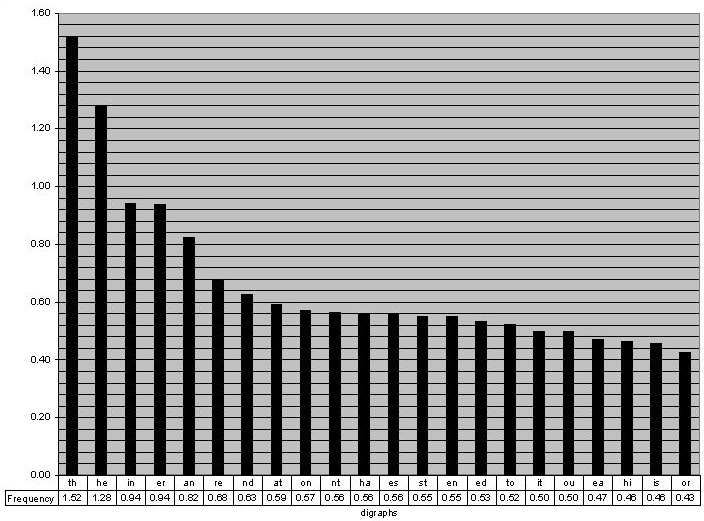
    +---------+---------------+-----------+-------------------------------------+
    | Digraph | Frequency (%) | Adjacent? | Pair on Keyboard                    |
    +---------+---------------+-----------+-------------------------------------+
    | TH      | 1.52          | Yes       | T is right of H                     |
    | HE      | 1.28          | No        | Separated by O and [Space]          |
    | IN      | 0.94          | Yes       | I is top-left of N                  |
    | ER      | 0.94          | Yes       | E is below R                        |
    | AN      | 0.82          | No        | A is bottom-center; N is top-right  |
    | RE      | 0.68          | Yes       | R is above E                        |
    | ND      | 0.63          | No        | N is top-right; D is bottom-right   |
    | AT      | 0.59          | No        | Separated by [Space] and S          |
    | ON      | 0.57          | No        | Separated by H and T                |
    | NT      | 0.56          | Yes       | N is top-right of T                 |
    | HA      | 0.56          | No        | Separated by [Space]                |
    | ES      | 0.56          | No        | Separated by [Space]                |
    | ST      | 0.55          | Yes       | S is below T                        |
    | EN      | 0.55          | No        | N/E are on opposite sides           |
    | ED      | 0.53          | No        | E is center-left; D is bottom-right |
    | TO      | 0.52          | No        | Separated by H                      |
    | IT      | 0.50          | Yes       | I is above T                        |
    | OU      | 0.50          | Yes       | O is below U                        |
    | EA      | 0.47          | Yes       | E is top-left of A                  |
    | HI      | 0.46          | Yes       | H is below-left of I                |
    | IS      | 0.46          | No        | Separated by T                      |
    | OR      | 0.43          | Yes       | O is below R                        |
    | TI      | 0.34          | Yes       | T is below I                        |
    | AS      | 0.33          | Yes       | A is below-left of S                |
    | TE      | 0.27          | No        | Separated by H and [Space]          |
    | ET      | 0.19          | No        | Separated by H and [Space]          |
    | NG      | 0.18          | Yes       | N is above G                        |
    | OF      | 0.16          | Yes       | O is below F                        |
    | AL      | 0.09          | Yes       | A is right of L                     |
    | DE      | 0.09          | No        | E/D are distant                     |
+---------+---------------+-----------+-------------------------------------+I go to spell something as simple as my name on this and none of the keys are anywhere near where 40 years of muscle memory expect.
Frankly, I just want to hit the letters with the same thumb.
I understand not wanting to copy, to be a purely original creation, but you could certainly help adoption by making it a little less painful.
for example, "The quick brown fox jumps over the lazy dog.” — < means left hand, > means right hand. you can see in a common phrase like this, you alternate sides more often. when you’re thumb-tapping, i think this is useful.
<t >h <e <q >ui <c >k <br >o <w >n <f >o <x >jump <s >o <ver t >h <e >l <az >y <d >o <g
I submit the idea that for most smartphone users, distance traveled and layout are not the limiting factor for typing speed.
Just sayin'...